Is PUBG Cross Play Real? 5 Facts Before You Queue
Your friend just bought a PS5. You’re on Xbox Series X. Is PUBG cross play about to save squad night, or will you spend it shouting across separate lobbies?
The honest answer is “yes, but only in one direction.” Console players can mix, while PC and mobile players can’t. Here’s how it fits together and where most people get tripped up.
Quick Answer: Yes, partly. PUBG: BATTLEGROUNDS lets PlayStation 5 and Xbox Series X|S players share one console matchmaking pool. PC players queue in their own pool, and PUBG Mobile is a separate game with separate servers.
Is PUBG Cross Play Possible Between Console and PC?
Not today. Krafton, the studio behind PUBG: BATTLEGROUNDS, keeps console and PC in separate matchmaking pools.
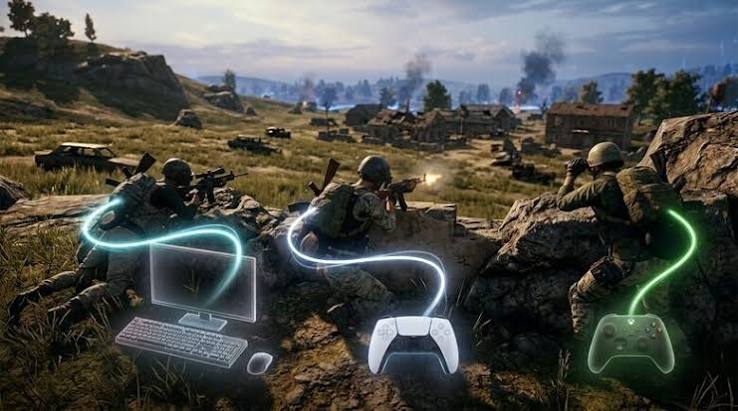
Picture a console player crouched inside a Pochinki house. A PC player outside sprays the window with a mouse and snaps between targets faster than any thumbstick allows. That mismatch is the reason for the wall. It’s a design choice, not a missing feature, so don’t wait for a switch that flips it on later. My own read is that PC to console is unlikely.
Update schedules matter too. PC and console builds can ship on different timelines, and merging them would mean waiting on the slowest one. Keeping platform pool separation protects fairness for both groups.
Next question: who can actually squad up?
Does PUBG Have Crossplay? Platform by Platform
Here’s the current picture:
- PS5 with Xbox Series X|S: yes, through the shared console pool
- PS5 with PS5, or Xbox with Xbox: yes
- Steam players with other PC players: yes, inside the PC pool
- PC with console: no
- PUBG Mobile with PC or console: no
- PS4 and Xbox One: no longer supported
That last item catches people out. PUBG Console went current generation only after the November 13, 2025 service update. PlayStation owners had to download the PS5 version, and Xbox owners received the current gen build through Smart Delivery.
Two related questions come up a lot. Is PUBG on Switch? I couldn’t confirm an official Switch release of BATTLEGROUNDS, so check the Nintendo eShop before paying for anything. And does PUBG Mobile have controller support? Gamepad support depends on your device and app version, but it doesn’t change the fact that mobile stays walled off.
Knowing the rules is half the job, so let’s set it up.
Is PUBG Cross Play Hard to Set Up?
No. It takes about two minutes:
- Update PUBG on your PS5 or Xbox Series X|S. Mismatched builds cause most “can’t find my friend” problems.
- Open the settings menu, go to Gameplay Settings, and find the crossplay option. Make sure it’s on.
- Add your friend through the in game friends list, or search their exact PUBG username if they’re on the other console brand.
- Send a party invitation and queue together.
Party features across console brands have changed over the years, so check the latest patch notes if the invite button is missing. If a friend won’t appear, run through this checklist:
- Both players have crossplay enabled
- Both are on the latest game version
- The username is spelled exactly right
- Your connection is stable
- No temporary server issue is active
Turning crossplay off uses the same menu. The trade-off is a smaller pool and longer waits, especially late at night. Disabling it also won’t cure lag, because ping depends on your connection and server region, not the toggle. For casual squads I’d leave it on. Competitive players who want fewer variables may prefer it off, but they should expect slower lobbies.
Is PUBG Cross Platform for Progress and Purchases?
Here’s what many guides blur together: crossplay and cross progression are different features. Playing together doesn’t mean your stuff moves with you.

Skins, stats, and battle pass rewards don’t transfer between PC and console, or from PlayStation to Xbox. The one exception is a hardware upgrade within the same family. Krafton said account data and purchased items carry over when you move from PS4 to PS5 or Xbox One to Series X|S.
Your Krafton ID is worth linking for account security, but don’t expect it to merge inventories across platforms. Before you buy cosmetics on a new system, assume they stay where you bought them.
Voice chat is the last piece.
Voice Chat, Myths, and Common Problems
Team voice chat and proximity chat are built into the game, and both work inside a match. Console party chat is where cross platform communication gets shaky. If you can’t hear a teammate on another brand, check your in game voice settings first, then the console privacy settings. Honestly, a Discord call on a second device is the most reliable fallback I know of.
Three myths keep circulating:
- Myth: PC and console players share standard matches. Fact: they don’t.
- Myth: Crossplay moves your progress. Fact: it doesn’t.
- Myth: Every PUBG version supports crossplay. Fact: mobile doesn’t.
Frequently Asked Questions
Is PUBG crossplay between PC and Xbox?
No. PC and console use separate matchmaking pools.
Can PS5 and Xbox Series X|S players play PUBG together?
Yes, with crossplay enabled in Gameplay Settings.
Is PUBG crossplay between PS4 and Xbox One still possible?
No. Both were retired after the November 13, 2025 update.
Does PUBG have cross progression?
Not between PC and console or between PlayStation and Xbox. Same family upgrades keep your data.
Can PUBG Mobile players play with PC or console users?
No. Mobile runs on its own servers.
conclusion
So, is PUBG cross play worth planning around? Yes, if your whole squad is on PS5 or Xbox Series X|S. If anyone is on PC or mobile, someone needs to switch platforms. Before your next session, open Gameplay Settings, confirm crossplay is on, and swap exact usernames with your friends.
Recommended Articles
How to Mine in Minecraft: Quick Guide to Ores, Depth & Safety
What Do You Do in Minecraft? Your First Day Survival Guide
Minecraft Online: How to Play With Friends, Multiplayer Options & Safety Guide
How Do You Jump in Minecraft? Distance, Height & Movement Guide
What to Put in a Minecraft House: 25+ Ideas for Every Builder